• News

    Service News


    Updated 37 days ago

    Problems sending emails

    08:47 on 12th Jun

    We are aware of a problem which has resulted in emails sent from our accounts being bounced back to the sender. 
     
    We are in the process of investigating this problem and will add a further update once this problem has been resolved. We apologise for any inconvenience this problems is causing
     
    Update
     
    The problem sending emails was the result of some of our IP addresses to be listed by Spamhaus. This issue has now been resolved, and the listings have been removed.
     
    Spamhaus is a widely used email reputation and blocklist service that many mail providers use to help identify and filter spam.
     
    Please be aware that some users may still experience occasional bounces from mail servers that are using Spamhaus data downloaded while the IPs were listed. These servers will stop rejecting messages once they refresh their Spamhaus data. As a result, some bounces may continue for a short period after the delisting, depending on each recipient mail server's update schedule.

    Server Maintenance - Monday July 7th 2025

    11:55 on 07th Jul

    We will be performing some server maintenance starting today, planned for the next few days.
     
    Services will remain available while the maintenance work is carried out, with a low risk of some minor disruption and performance degradation.

    Problems reported sending emails via Gmail account

    14:18 on 10th Jan

    We are aware of an issue affecting some users sending emails using a Gmail account when changing the 'Send As' address to the service email address. As the emails are not being sent via our servers they do not include a DKIM signature, which can result in failed authentication checks. This can then result in the receiving server rejecting the email or marking it as spam.This can be resolved by sending emails via our servers using one of the following methods:
    1. Send emails using our Webmail program
    2. Add your service email address to Gmail using SMTP
    Please note: SMTP is not included with Free Webmail accounts.You can check which of our email packages you are using by logging into your account and going to the My Account page (see button in the top right of Webmail)If you wish to, you are can upgrade an account so that includes SMTP by please doing the following:
    • Go to the My Account page
    • Click See Upgrades, select a package or bolt on and proceed to checkout.
    If you have any questions or need any assistance, please feel free to contact our Helpdesk at help@aluminati.net and we will be happy to help.

    Get Help and Advice

    How can we help you?

    Back to Help Topics

    How do I automatically forward my emails to another account?

    Our webmail service comes with the ability to forward your emails to another email account of your choice.

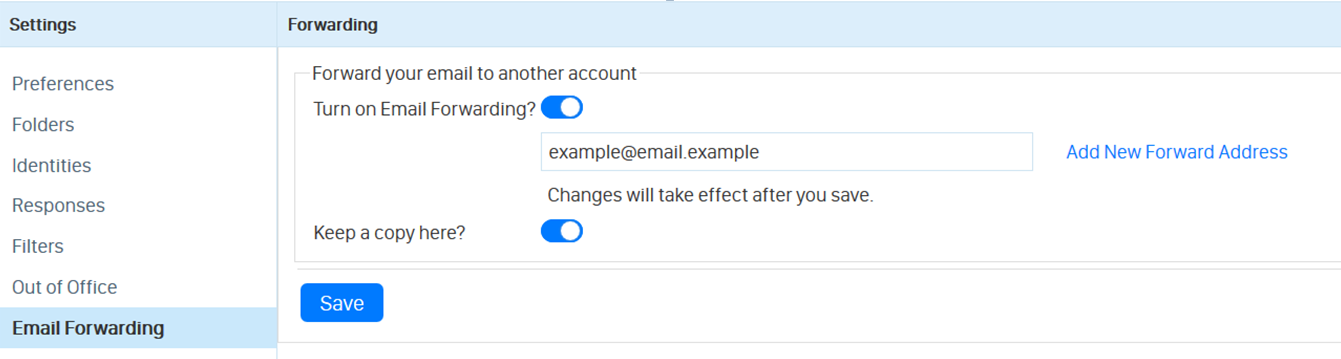
    To set up an auto forward to one or more accounts using Webmail, simply log in to your webmail account and Follow the steps below:

    • Go to Settings found in the top right hand of the screen.
    • Go to the Email Forwarding section.


    • Turn on email forwarding by pressing the Turn on Email Forwarding? toggle.

    • Enter the email address that you would like to forward your messages to.

     

    • Check the Keep a copy here? toggle if you would like any emails kept in your inbox. Please note that if emails forwarded are not kept, they will not be retained on our servers, and so we will not be able to retrieve them if they are lost.

    • Finally, hit Save.

    If you have any further issues setting up email forwarding, please contact our helpdesk at help@aluminati.net